
Structuring the Troubleshooting Process

Are your support cases taking a long time to get resolved? Do support engineers have to go back to customers for “more information” days or weeks into the resolution? Do hard-won fixes get deployed only to find out that they do not fix the customer’s issue? You likely have a troubleshooting problem.
Troubleshooting is not unique to technical support. Doctors, mechanics, teachers, and many other professionals rely on it. Surprisingly, troubleshooting is rarely taught as a skill in itself; instead support engineers (and doctors, mechanics, and teachers) rely on crude pattern matching. “I’ve seen this problem before, and X worked, so I will recommend X to address it” replaces a thoughtful analysis of underlying causes. No wonder we experience resolution delays, frustrated support engineers, and dissatisfied customers.
There is a better way: introducing structure to the troubleshooting process, training support engineers to use a structured process, and providing coaching and assistance within the structure. Let’s start with the structure itself.
The 4 Phases of Troubleshooting
Inspired by the venerable Kepner-Tregoe method for decision analysis, it’s useful to think of troubleshooting in a tech support environment in four phases.
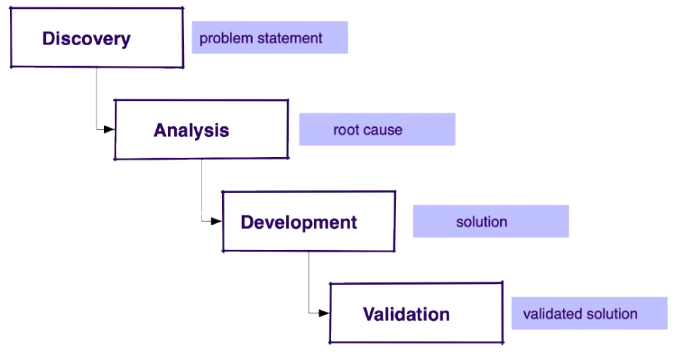
- Discovery: a fact-finding phase to uncover the full context of the issue to ultimately obtain a complete problem statement
- Analysis: the core of troubleshooting, where we search the knowledge base, reproduce the issue, consult with others and documentation to identify a possible root cause
- Development: the creation of the solution to the problem we identified, which could be a set of steps, a workaround, or a software fix, delivered as a proposed solution
- Validation: working with the customer to deploy the solution and confirm that it is, indeed, a validated solution
Note that each phase ends in a deliverable or gate, clearly identifying the transition to the next phase. For instance, proceeding to Analysis without a complete problem statement is dangerous. Of course, the process is not linear and support engineers may need to loop back to a prior phase, but we aim to move forward through the phases.
Troubleshooting Issues & Solutions
Now that we have defined troubleshooting phases, we can analyze our issues and find appropriate solutions. Which ones look familiar to you?
Incomplete Discovery
Customers rarely present a full set of symptoms or environment details, so it’s up to the support engineer to obtain all the necessary information upfront. Subpar discoveries send support engineers on the wrong track, delaying resolution. And when we need to go back to the customer again and again for more information, especially late in the game, we rile them up.
Help support engineers conduct better discovery by providing discovery checklists.
Sloppy Pattern Matching
It’s quick and easy to pattern-match and move on–but if the support engineer guessed wrong, there will be frustration on both sides.
Provide formal troubleshooting training to the support engineers (we can help!) and enforce the discipline of not moving to the next step too soon. Also, develop troubleshooting guides for the most common issue types. They are very useful when issues are complex and don’t lend themselves to obvious pattern-matching.
Slow Solution Development
Maybe your team is doing a great job troubleshooting (congrats!) but the Development phase grinds to a halt as you wait for the Engineering team to create fixes. Implement a mechanism to track and escalate delays.
Skipping the Validation
Support engineers can be so happy and relieved that they have a solution that they just move on, only to find that the customer is frustrated because the solution does not work the way they were expecting. Emphasize that the issue is not resolved until the customer says it’s resolved.
Unrealistic Customer Expectations
Complex troubleshooting takes time. Many of us have been faced with a customer demanding a commitment for when the issue will be fixed when the issue is brand new and we are still in discovery mode, with no idea of what the root cause may be, let along what the solution will entail.
You can use the structured process to show the customer where you are in the process. Are we still in the discovery phase? Do we need information from them? Are we in the Analysis phase? We will need to complete it before making any promises for a fix timeframe.
Getting Stuck
Even support engineers who use the structured troubleshooting process will get stuck sometimes. Provide help channels for every phase of the process. Think team scrums, individual queue reviews by managers, and active management for issues that require separate organizations (Engineering, IT, etc.)
Reinventing the Wheel
Promote a robust knowledge management discipline to avoid having to reinvent the wheel. A documented solution will be found early in the analysis stage and save time and frustration.
I’m a great fan of structured troubleshooting, as it increases productivity, employee satisfaction, and customer satisfaction (what a trifecta!) Do you follow a structured model for troubleshooting? How does it work in your context?